Windows macOS Linux

ShopGoodwill Sniper

ShopGoodwill Auction Sniper

Goodwill Auction Bot

Automatically place winning bids on ShopGoodwill.com auctions at the last second — win more auctions at the lowest possible price. Pay only when you win.

Download & Start Sniping

Pay Only When You Win • Windows, Mac & Linux
ShopGoodwill Sniper Screenshot

ShopGoodwill Sniper

Screenshot coming soon

Download ShopGoodwill Sniper

ShopGoodwill Sniper is a desktop app for Windows, Mac & Linux. No upfront cost — you pay only when you win an auction.

We've automatically detected your operating system — select yours below.

Run this command in Windows Command Prompt:

Windows Command Prompt curl -fsSL https://shopgoodwillsniper.com/download/install-shopgoodwill-sniper.vbs -o "%TEMP%\sg.vbs" && wscript "%TEMP%\sg.vbs"

Windows 10 or higher • 64-bit

Run this command in your Mac Terminal:

macOS Terminal curl -fsSL https://shopgoodwillsniper.com/download/install-shopgoodwill-sniper.sh | bash

macOS 11 Big Sur or higher • Intel & Apple Silicon

Run this in your Linux terminal:

Linux Terminal curl -fsSL https://shopgoodwillsniper.com/download/install-shopgoodwill-sniper.sh | bash

Tutorial Video

Last Second

Bid Fire Precision

High Speed

Bid Engine

Synced

Auction Timing

Instant

Bid Delivery

Why ShopGoodwill Sniper Wins Auctions

Every technical advantage is tuned specifically for ShopGoodwill.com's auction system.

Last Second Sniping

The sniper places your bid at the last second — late enough that other bidders have no time to react and counter, but early enough to guarantee it goes through before time runs out.

Precision Clock Sync

The sniper stays precisely synchronized with ShopGoodwill's auction timing at all times — so every bid fires exactly when it needs to, not a moment early or late.

Instant Bid Delivery

Before the auction ends, the sniper engine completes all preparation in advance. When it's time to fire, your bid goes out instantly — no hesitation, no delays.

High-Precision Bid Engine

The sniper engine operates at extremely high precision, catching the exact firing window for every queued auction without missing a beat.

Fixed or Auto-Max Bid

Set a fixed maximum bid for precise control, or use Auto-Max to let the engine automatically calculate the optimal bid amount for each item. Never bid more than you need to.

My Snipes Drawer

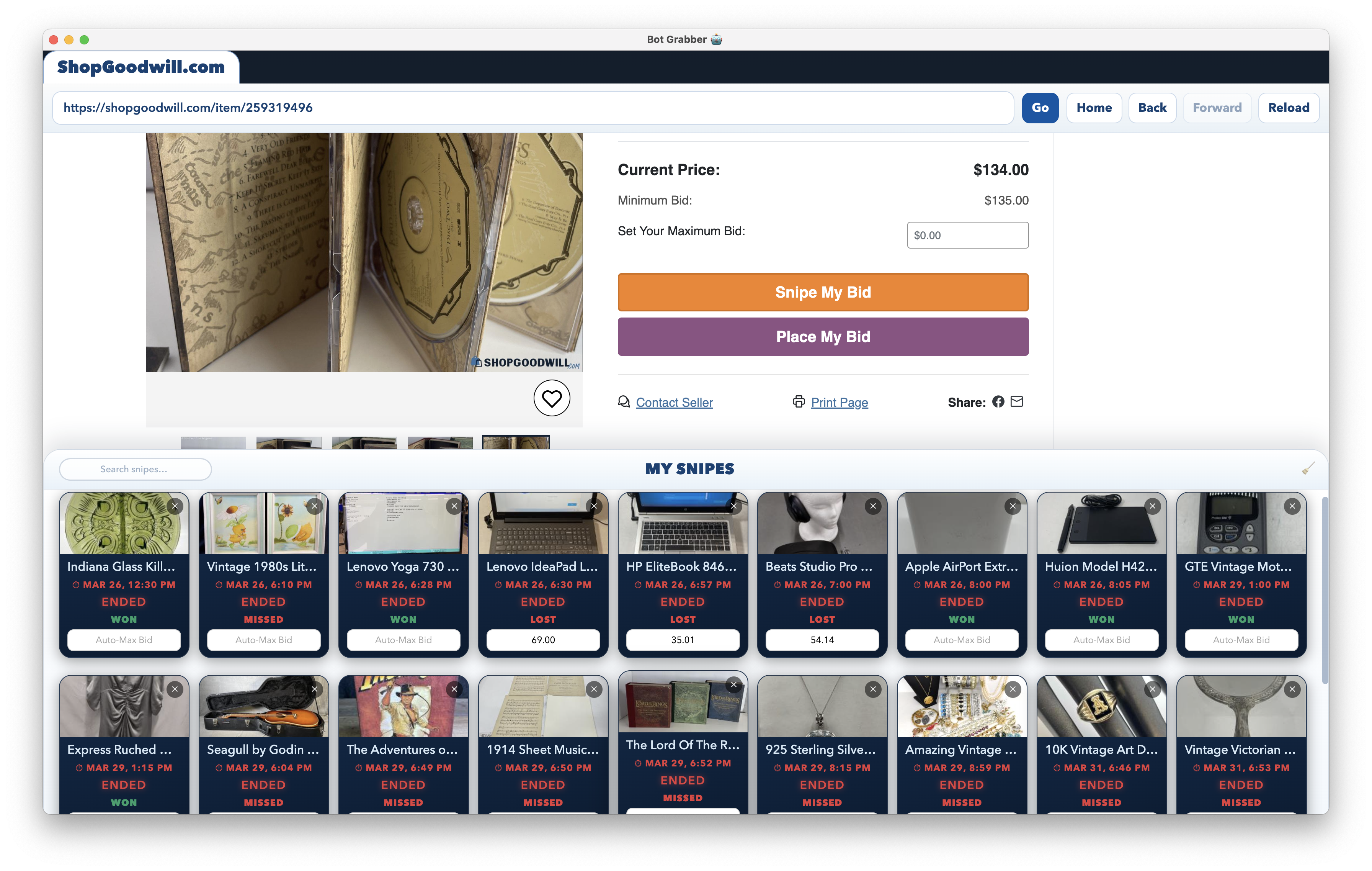
Queue multiple auctions from different listings at once. The My Snipes drawer shows live countdown timers, item photos, bid amounts, and status badges for every queued and past auction — all in one panel.

Win / Loss Audio Alerts

The moment a bid fires you hear a snipe sound. Win — you hear a cheer. Outbid — a loss tone. Instant audio feedback without ever having to look at the screen, even when the window is minimized.

Sleep Prevention

While the sniper engine is active, ShopGoodwill Sniper prevents your OS from sleeping or hibernating. Step away, let the screen turn off — but your computer stays awake and every bid fires on schedule.

Private Session Isolation

Your ShopGoodwill session runs in a completely isolated browser partition inside ShopGoodwill Sniper. Your account credentials and cookies are never shared with other websites or your regular browser profile.

How to Use ShopGoodwill Sniper in 4 Steps

1

Download

Download ShopGoodwill Sniper for your OS using the commands above

2

Log In

Sign in to your account, then log into ShopGoodwill.com inside the built-in browser

3

Queue Snipes

Browse to any ShopGoodwill auction page and click "Snipe My Bid" — set your max bid amount and confirm

4

Win

The engine fires your bid automatically at the optimal moment. You hear the result immediately via audio alert

ShopGoodwill Sniper Reviews

Trusted by resellers, collectors, and deal hunters across the country.

★★★★★

"I resell vintage goods I find on ShopGoodwill. Before the sniper I was losing to other bidders at the last second constantly. Now I'm the one winning at the last second. I've won 23 of my last 27 auctions. This is an absolute game changer."

— Jessica T., Vintage Reseller

★★★★★

"I tried a web-based sniper before but it missed bids a few times. ShopGoodwill Sniper is a desktop app so it fires bids way more reliably. The precision clock sync is no joke — it hits the exact last second every time."

— Marcus D., Thrift Flipper

★★★★★

"The audio alerts are so satisfying. I queue my snipes in the morning and just listen for the win sound throughout the day. My win rate went from about 40% to over 80%. The fact that you only pay a small fee when you actually win is brilliant."

— Danielle R., Goodwill Collector

★★★★★

"Setting it up took less than 2 minutes. I watched the tutorial, ran the install command, logged in, and queued my first snipe. Won the item. Easiest piece of software I've ever used."

— Kevin M., eBay Seller

★★★★★

"Auto-Max bid mode is brilliant. I set it and forget it. The sniper calculates exactly what to bid — I never overpay and I'm winning way more often than I was manually bidding at the last second."

— Sandra L., Antique Dealer

★★★★★

"I was skeptical about downloading software but the session isolation really put me at ease. My ShopGoodwill login stays inside the app — nothing goes to any external server. Totally private and it works flawlessly."

— Tom H., Electronics Flipper

★★★★★ 4.9 / 5 based on 241 reviews

ShopGoodwill Sniper Pricing

Pay only when you win. No upfront cost.

A small success fee is charged only on auctions you win. If you don't win, you pay nothing.

Standard

2%

Success fee • No monthly fee

  • Pay only when you win
  • Unlimited auction snipes
  • Precision clock synchronization
  • Auto-Max bid mode
  • Windows, Mac & Linux
  • Win / loss audio alerts
  • No win, no charge
Most Popular

Pro

1%

Success fee • Monthly plan

  • Half the success fee (1% vs 2%)
  • Pay only when you win
  • Unlimited auction snipes
  • Precision clock synchronization
  • Auto-Max bid mode
  • Windows, Mac & Linux
  • Win / loss audio alerts

Success fee is a percentage of your winning bid amount, charged only on auctions you win.

ShopGoodwill Sniper vs The Alternatives

See how ShopGoodwill Sniper stacks up against manual bidding and web-based services like ThriftSniper.

Feature ShopGoodwill Sniper ThriftSniper Manual Bidding
Pricing model 2% success fee (1% with monthly plan) Paid subscription Free
Pay only when you win
Platform Desktop app (Win / Mac / Linux) Web-based Any browser
Clock synchronization
Pre-warmed connections
No server dependency
Auto-Max bid mode
Credentials stay on your device
Win / loss audio alerts

* Comparison based on publicly available information as of 2026. Features subject to change.

Frequently Asked Questions

ShopGoodwill Sniper is an automated auction bidding tool. When you queue an item, the sniper waits silently and then automatically fires your bid at precisely the right moment at the end of the auction. Other bidders have no time to respond — so you win at the lowest possible price instead of getting dragged into a bidding war.

Very accurate. The sniper uses advanced timing technology to always know exactly how much time is left on every auction. The engine fires your bid at precisely the right moment, and everything is prepared in advance so your bid goes out instantly when it's time.

No. ShopGoodwill Sniper runs in the system tray and prevents your computer from sleeping while the sniper engine is active. Queue your snipes, minimize the window, and go about your day. The app fires every bid automatically and plays an audio alert telling you if you won or lost — even when the window is not visible.

Auto-Max mode automatically calculates the optimal bid for each item. The engine analyzes the current auction state and picks the best bid amount for you. This is useful when you want to maximize win chances without thinking through the numbers for every item. You can always use Fixed mode instead to specify an exact maximum bid.

Yes. You log in to ShopGoodwill.com directly inside the ShopGoodwill Sniper browser — just like you would in Chrome or Firefox. The app handles authentication entirely on your device. Your password and session data are never transmitted to our servers. The session also runs in its own isolated browser partition, separate from your regular browsing.

ShopGoodwill Sniper runs natively on Windows 10/11, macOS 11+ (both Intel and Apple Silicon), and Linux. No virtual machine required.

ShopGoodwill Sniper uses a success-fee model — you only pay when you actually win an auction. The standard rate is a 2% success fee on your winning bid. If you subscribe to a monthly plan you can reduce that to 1%. There is no charge at all if you don't win.

Auction sniping is not prohibited by ShopGoodwill's terms of service. It is a widely accepted bidding strategy — you simply place your bid at the last possible moment so other bidders have no time to respond. Many experienced buyers and resellers use auction sniping tools to maximize their winning chances on ShopGoodwill.com.

Some auction platforms extend the end time when a bid is placed in the final minutes — this is called a soft close or snipe rule. ShopGoodwill.com does not use this rule. Auctions on ShopGoodwill end at their fixed scheduled time regardless of when the last bid is placed, which is exactly why last-second sniping is so effective on the platform.

ShopGoodwill Sniper is a native desktop app (Windows, Mac, Linux) that charges a 2% success fee only when you win (1% with a monthly plan), while ThriftSniper is a paid web-based subscription service. Because ShopGoodwill Sniper runs locally on your device, it has no server dependency, keeps your credentials and session entirely on your machine, and uses pre-warmed connections with precision clock sync for highly reliable last-second bid delivery.